


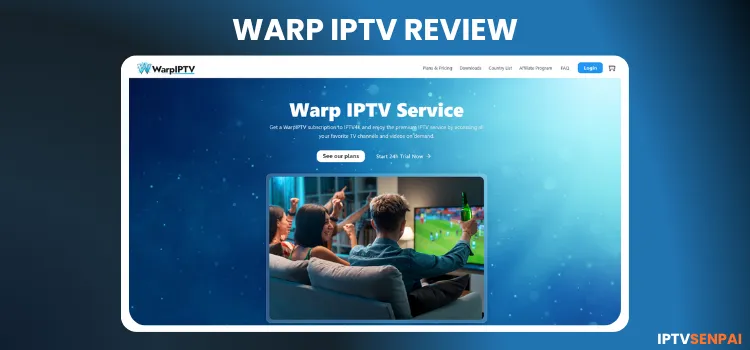
 Warp IPTV is a new IPTV streaming platform operating for less than a year. It boasts a lineup of 30,000+ live TV channels, alongside a VOD library featuring 42,000+ movies and 7,000+ TV series in HD, FHD, UHD, and 4K quality. It offers a 24-hour free trial.
Despite its vast library, users might occasionally experience minor buffering. Because this is an unverified service, running a premium VPN is crucial. Using Surfshark hides your online footprint and prevents ISP throttling.
Recommended VPN for IPTV - Surfshark

Using IPTV without a VPN can put you at Big Risk! Your ISP, government and even IPTV providers can monitor your activity, throttle your speed, or block access altogether.
Plus, without encryption, your data is exposed to hackers and third parties. Take back your privacy with Surfshark!
Features:
✅ SAVE 87% + GET 3 EXTRA MONTHS FREE! ($0.06/day)
✅ Kill Switch Feature to protect you if VPN drops
✅ Lightweight app ensuring smooth performance on All IPTV Boxes
✅ Unlimited simultaneous connections (install on all household devices)
✅ 30-day risk-free money-back guarantee
✅ Strict no-logs policy, Secure & Untraceable
Official Website of Warp IPTV
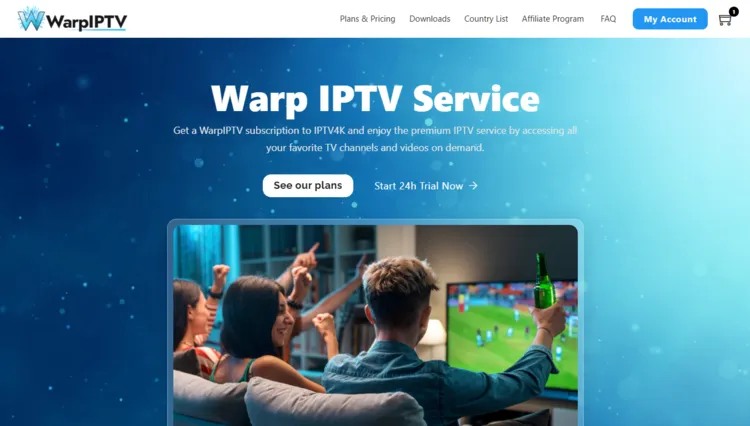
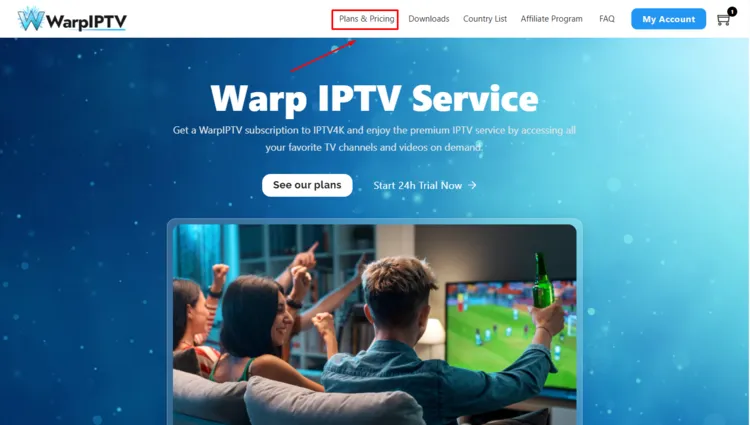
Unverified services often face the issue of copycat sites attempting to steal user data. Always verify the site’s layout using the screenshot provided above. Do this before entering any personal information or purchasing a subscription plan to ensure your safety.
To maintain complete security and avoid malicious clones, visit the official Warp IPTV website directly at ‘warpiptv.com’. Due to strict legal and regulatory guidelines, we cannot provide a direct hyperlink to the platform here.
Does Warp IPTV Offer a Free Trial?
Yes, Warp IPTV does offer a 24-hour free trial for new users. The free trial was delivered to me within a few minutes.
To claim your free trial, visit their official website, sign in, and click on Get 24 Hour Trial Now. Enter your details, and you will receive login credentials on the website portal.
Warp IPTV Quick Overview
- Trial: 24 Hour Free Trial
- Price: starting at $12/month
- Connections: Up to 5 simultaneous connections
- Live Channels: 30,000+ live TV channels
- VOD Content: 42,000+ movies and 7,000+ TV series
- Streaming Quality: HD, FHD, UHD, and 4K resolution
- Payment Methods: Credit Card, Debit Card, Cryptocurrency
- Compatible Players: Tivimate, IPTV Smarters Pro, Sparkle player
- Compatible Devices: Android, iOS, Firestick, Windows, macOS, Linux, tablets, smart TVs, and streaming boxes.
-
Customer Support: Email
Pros & Cons
| Pros | Cons |
|---|---|
| 24-Hour Free Trial | Occasional buffering during high-demand live sporting events. |
| Supports HD, FHD, UHD, and 4K resolutions | Customer support is restricted to email only |
| Supports up to 5 connections | |
| Massive library of live TV channels | |
| Neatly arranged VOD library |
How to Get Warp IPTV
Follow the step-by-step guide to set up Warp IPTV on FireStick.
Step 1: Sign Up for a Subscription Plan/Free Trial.
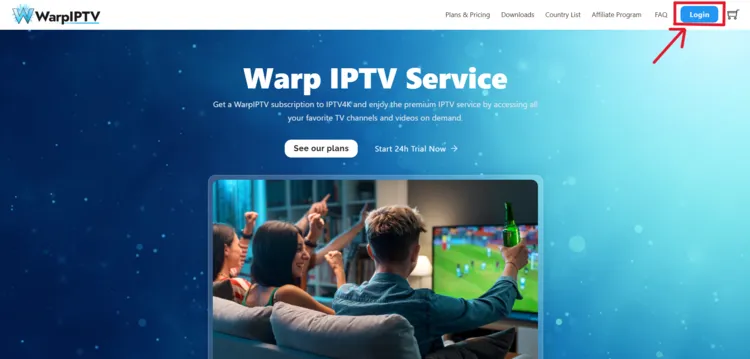
Step 1: Visit warpiptv.com and click on Login Button on the top right.
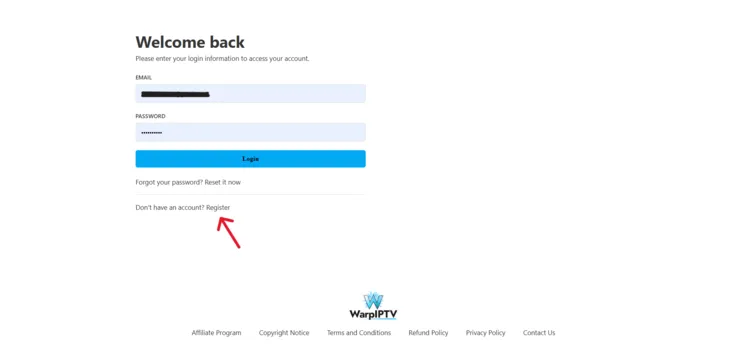
Step 2: A Welcome back window will open. Click on Register below.
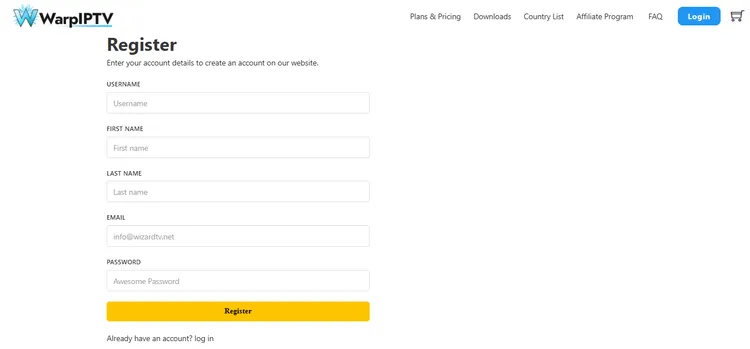
Step 3: A Register window will open. Enter your registration details and click on Register.
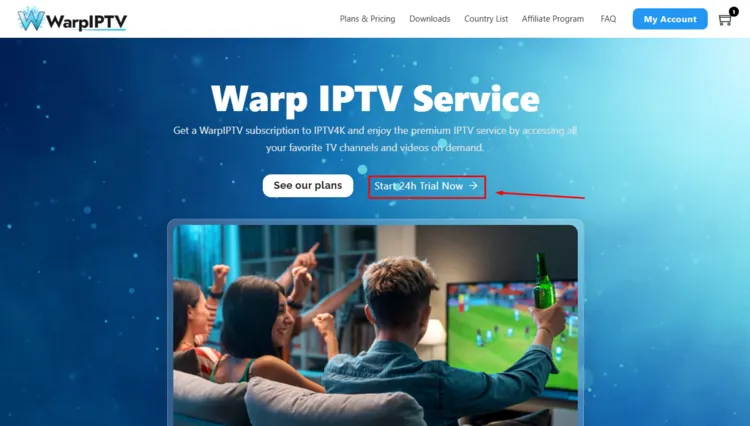
Step 4: On the home screen, click on Start 24 Hour Trial Now.
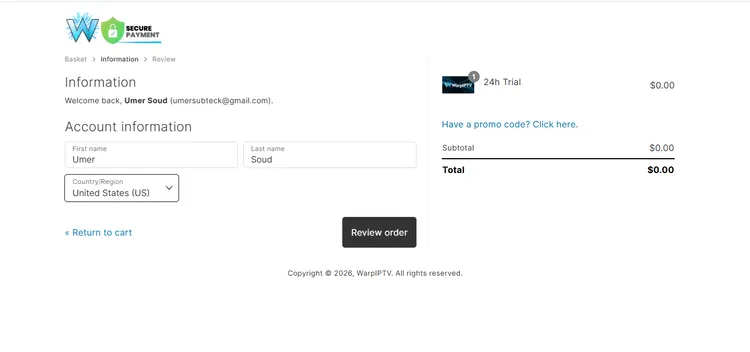
Step 5: An Information and Account Information window will open. Enter your details and click on Review Payment.
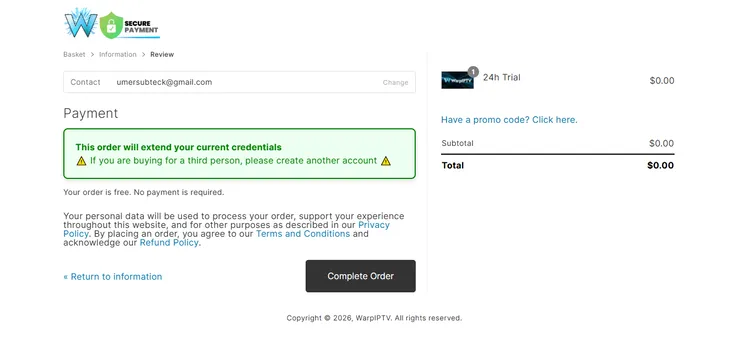
Step 6: Select the payment method. Click on Complete Order.
Step 7: To purchase a subscription plan, click on Plans & Pricing.
Step 8: Select a subscription plan of your choice by clicking on Add to Cart.
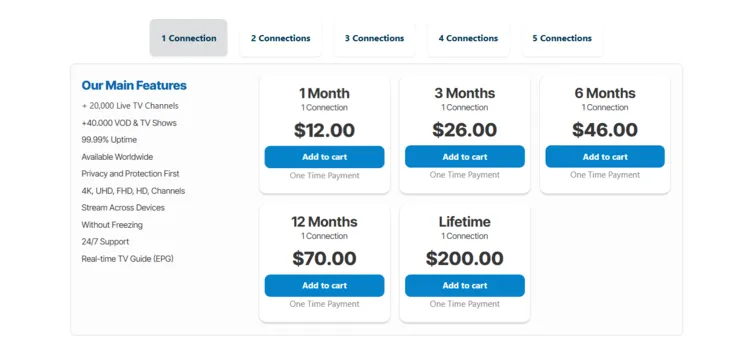
To purchase the subscription, follow the remaining steps from Step 5 to Step 6.
Step 2: Connect to a VPN & Set Up Your Player
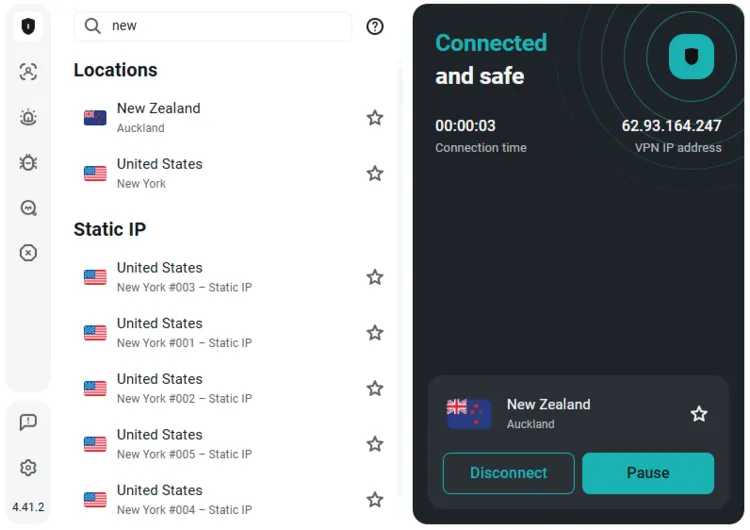
Step 1: Open Surfshark and connect to any server.
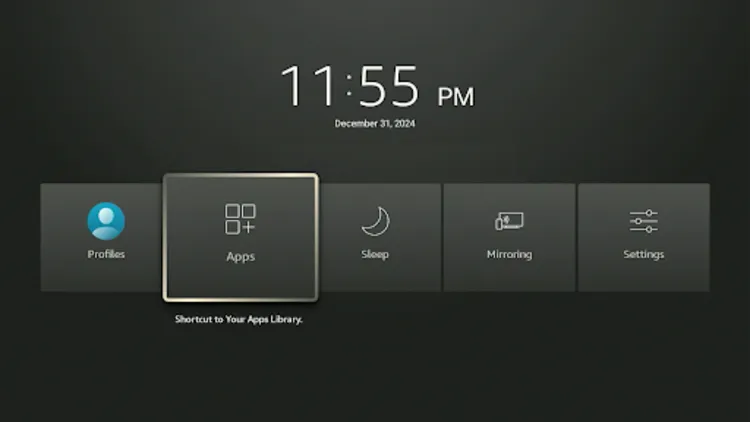
Step 2: Turn on your Fire TV Stick. Long-press the Home button, and click Apps.
Step 3: Select IPTV Smarters Pro from your apps.
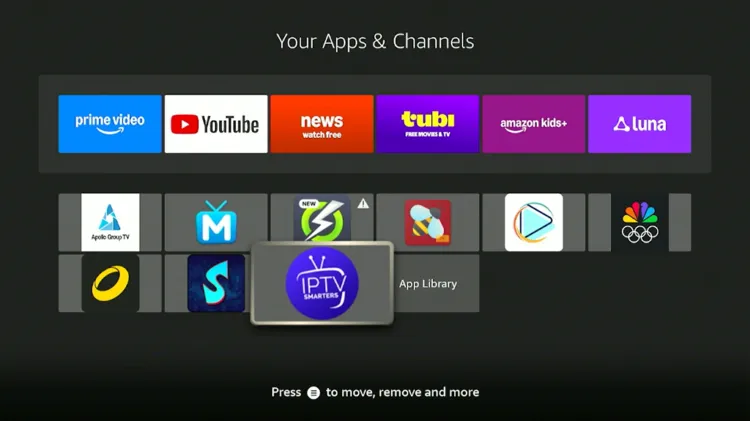
Step 4: Select Xtream Codes.
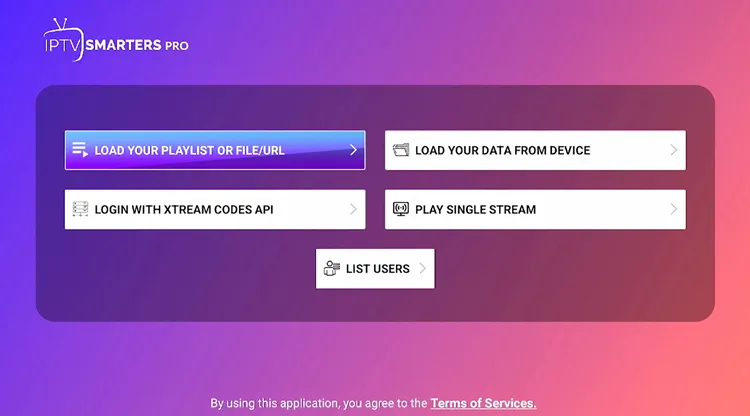
Step 5: Enter Playlist Name, Server address, Username, and Password. Then click on Add Playlist.
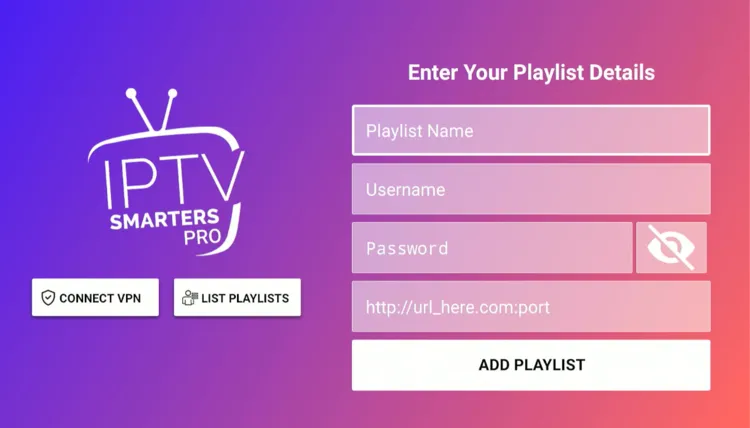
Step 6: Warp IPTV has been successfully set up.
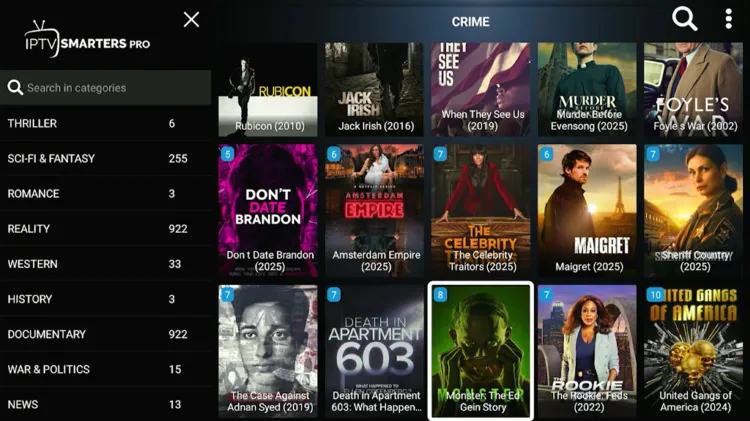
Step 7: Enjoy Streaming!

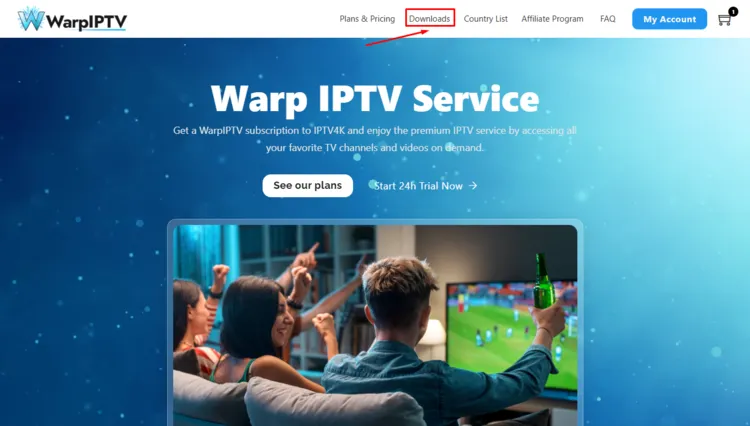
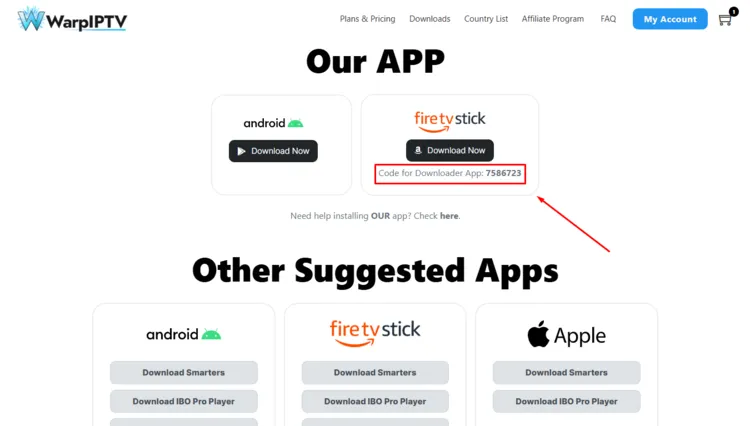
Optional: Warp IPTV also has a Custom IPTV Player, which you can also download. To install the service in the app, go to Downloads.
 Use the mentioned Downloader Code to install the app.
What Can You Stream on Warp IPTV?
1. Live TV
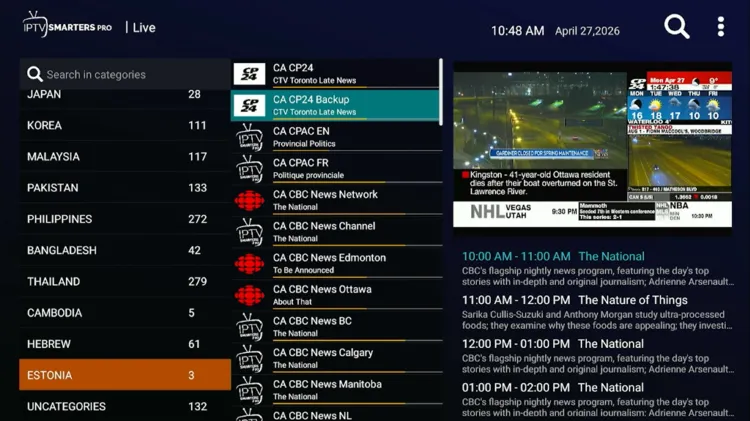
Warp IPTV delivers a massive selection of 30,000+ live TV channels, extensively covering content from North America, Europe, and Asia. Viewers can enjoy an incredibly smooth experience, as the platform suffers from little to no buffering.
The Electronic Program Guide (EPG) is highly reliable for France, U.S, U.K, Canada, and Italy. It perfectly organizes news, entertainment, sports, documentary channels, and various other European networks for seamless navigation.
2. Live Sports
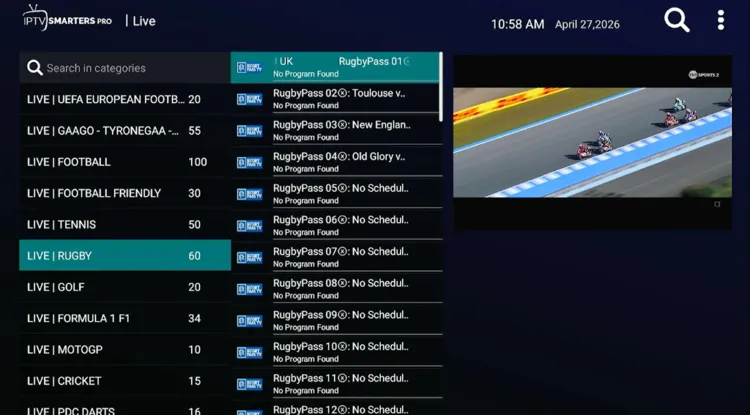
Sports enthusiasts will find extensive coverage of skateboarding, tennis, MMA, wrestling, football, soccer, golf, and cricket.
The service provides access to premium networks, including Cricbuzz, TSN Sports, ESPN, Fox Sports, Bein Sports, and NBC Sports. However, viewers should be prepared for some buffering issues during high-demand live sporting events.
3. VOD
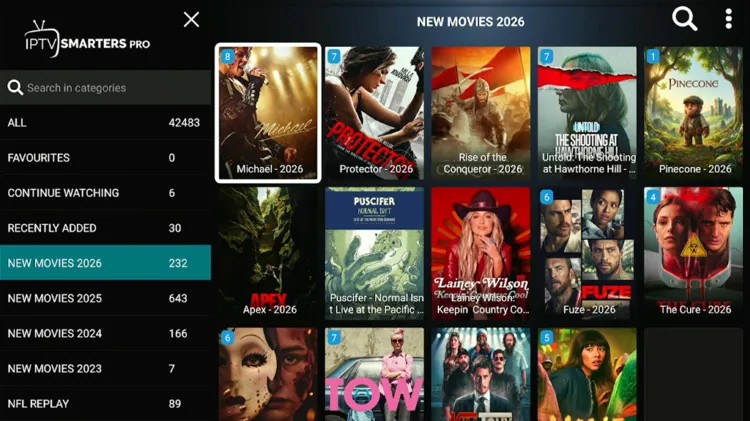
The VOD section is a standout feature, boasting 42,000+ movies and 7,000+ TV series. Content is neatly arranged into specific genres, making it easy to find blockbusters from Disney, Universal, Sony, Pixar, Paramount, and Netflix.
Much like the standard live TV section, the VOD library performs exceptionally well. Viewers can expect little to no buffering issues when watching their favorite movies or binge-watching television series, making the entertainment experience highly enjoyable.
How Much Does Warp IPTV Cost?
Warp IPTV offers 5 distinct subscription plans, providing exceptional value by allowing up to 5 simultaneous connections. Each package grants full access to the massive live TV, extensive VOD library, and global sporting events.
The service also comes with a 24-hour free trial. I received a free trial within a few hours. For payments, Warp IPTV accepts Credit/Debit Card and Cryptocurrency.
Here are the pricing plans:
| Plan Duration | 1 Connection | 2 Connections | 3 Connections | 4 Connections | 5 Connections |
|---|---|---|---|---|---|
| 1 Month | $12 | $22 | $30 | $40 | $50 |
| 3 Months | $26 | $36 | $44 | $56 | $70 |
| 6 Months | $46 | $55 | $65 | $82 | $100 |
| 12 Months | $70 | $96 | $110 | $140 | $175 |
| Lifetime | $200 | $310 | $410 | $520 | $620 |
Is Warp IPTV Legal and Safe to Use?
Because Warp IPTV is an unverified IPTV provider, there are inherent risks regarding data privacy and legality. Government scrutiny over unregulated streaming platforms remains incredibly high, making it essential to protect yourself while streaming.
The platform states that no VPN is required, but running a premium VPN is still strongly advised. Surfshark hides your IP address, completely encrypts your data, and shields you from both potential ISP throttling and regional broadcast blocks.
How good is Warp IPTV Customer Support?
Warp IPTV Alternatives
FAQ’s
1. Does Warp IPTV offer a free trial?
Yes, Warp IPTV provides a 24-hour free trial. Claim it by registering on their official website. Login credentials are typically delivered within a few minutes.
2. How many connections does Warp IPTV support?
Warp IPTV is highly flexible, offering up to 5 simultaneous connections depending on your subscription plan, allowing you to stream on multiple devices at once.
3. What payment methods does Warp IPTV accept?
You can purchase a subscription using Credit Cards, Debit Cards, or Cryptocurrency.
4. Does Warp IPTV offer refunds?
Yes, Warp IPTV offers a 7-day refund window for valid issues like technical problems or unauthorized charges. After a given timeframe, no refunds are provided, except in rare cases at their discretion.
My Final Verdict for Warp IPTV
Even though no VPN is required, the service remains unverified. For absolute security and best performance, always use a premium VPN to protect your privacy and guarantee maximum streaming stability. Surfshark is my #1 pick.

