



Streaming without protection is a huge risk, as most IPTV services are unverified. They can cause privacy breaches, legal trouble, or ISP throttling. This guide explains everything you need to know about Best VPNs for IPTV, helping you decide if one is right for you.
In 2026, using a premium VPN is essential to protect your data and secure a smooth connection. I don’t stream without Surfshark
Recommended VPN for IPTV - Surfshark

Using IPTV without a VPN can put you at Big Risk! Your ISP, government and even IPTV providers can monitor your activity, throttle your speed, or block access altogether.
Plus, without encryption, your data is exposed to hackers and third parties. Take back your privacy with Surfshark!
Features:
✅ SAVE 87% + GET 3 EXTRA MONTHS FREE! ($0.06/day)
✅ Kill Switch Feature to protect you if VPN drops
✅ Lightweight app ensuring smooth performance on All IPTV Boxes
✅ Unlimited simultaneous connections (install on all household devices)
✅ 30-day risk-free money-back guarantee
✅ Strict no-logs policy, Secure & Untraceable
Do you need a VPN for IPTV Streaming?
Whether you need a VPN for IPTV depends on your priorities and circumstances. While it is not mandatory, it can be a helpful tool for your IPTV streaming.
You Might Not Need a VPN If:
– Privacy isn’t a top concern for you.
– Your country’s laws regarding streaming are lenient.
– You do not experience network throttling.
– You only watch locally available content.
– You’re not concerned about your ISP’s policies.
You Must use a VPN If:
– You live in countries with strict laws like the US, UK, or Canada.
– You want to access geo-restricted IPTV content.
– Your ISP actively throttles your streaming speeds.
– You face constant buffering while streaming.
Why VPN is a Must-Have for IPTV Streaming
A VPN offers a smooth and safe IPTV experience by solving common issues such as buffering, restrictions, and privacy issues. Here is why it is an important tool for IPTV streaming.
1. Overcome ISP Throttling
Ever noticed your IPTV suddenly buffering for no reason? That’s likely ISP throttling, when your internet provider intentionally slows down your speed for various reasons:
- Network Congestion: To manage high traffic volumes during peak hours. (e.g, during a football match)
- Data Caps: If you’ve exceeded your monthly data allowance.
-
Content Type: If ISPs detect unverified high-bandwidth services like copyrighted content (IPTV).
2. Unblock Geo-restrictions
Have you ever tried to watch a TV channel or show, only to see the message: ‘This content isn’t available in your region’ That’s called a geo-restriction. Here are some common situations where it happens:
- Country restrictions: Some streaming services only work in specific countries.
- Travelling abroad: Your home streaming service may stop working when you are overseas.
- Regional sports blackouts: Certain live sports are only available in selected regions.
Example: If you’re in the US and want to watch a UK-only streaming service, then connect to a UK VPN server to access region-locked content while keeping your streaming private and secure.
3. Stream Safely
Many people don’t think about privacy when streaming IPTV, but it’s something you shouldn’t ignore. Your internet activity can often be seen by others, including your ISP. Here are a few common privacy concerns:
- ISP monitoring: Your internet provider can see your streaming activity.
- Online tracking: Third parties may collect data about what you watch.
- Privacy risks: Your real IP address can reveal your approximate location.
5 Best VPNs For IPTV Streaming
With so many options available, choosing the best VPN for your IPTV can seem challenging. To make this process easier for you, here is a quick guide on the 5 best VPNs for IPTV. Below are the 2-year ‘BASIC plans’ because they are the most affordable for a customer.
| VPN | Servers | Connections | Key Features | Pricing | My Verdict |
|---|---|---|---|---|---|
| ExpressVPN | 3,000+ | 8 | No logs policy, Ad Blocker, Tracker blocker, private DNS, Kill switch, Lightway protocol | $3.49 USD/mo |
Premium security, Reliable performance, and Expensive. |
| Surfshark | 3,200+ | Unlimited | Data Breach Alerts, alternative email generator, kill switch, private DNS | $2.49 USD/mo |
Affordable Option with Unlimited Connections. |
| NordVPN | 7,200+ | 10 | No logs policy, DNS protection, automatic kill switch | $3.49 USD/mo |
Strong security and Broad Access. |
| IPVanish | 2,200+ | Unlimited | DNS protection, Unlimited bandwidth | $2.19 USD/mo |
Affordable and Basic Features. |
| Proton VPN | 8,600+ | 10 | Best Free VPN, No logs policy, kill switch | $2.99 USD/mo |
Best Free VPN, Budget-friendly option. |
Does a VPN Cause Buffering While I Use IPTV?
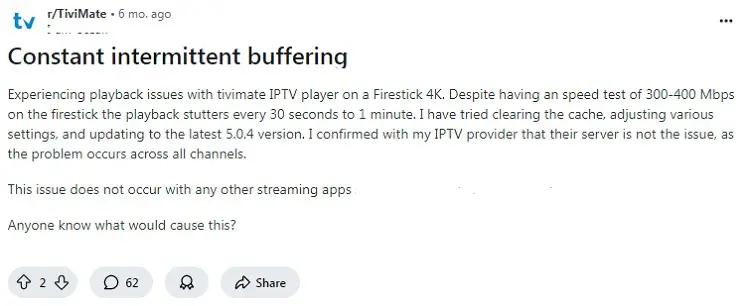
While VPNs improve your overall experience, certain setup issues can occasionally trigger temporary buffering during live streams.
Why Your VPN Might Cause Buffering If:
– Connected to an overly distant global server
– Double-VPN conflicts if your provider already uses a backend VPN.
– Low-bandwidth networks or outdated protocol selection.
How to Fix VPN Buffering:
– Switch to a server that is geographically closer to your location.
– Toggle your VPN protocol to WireGuard or NordLynx for maximum throughput.
– Contact your IPTV provider to check for backend network conflicts.
ISP or IPTV Provider – What’s Causing Buffering?
If your IPTV buffers regularly, especially during busy hours or while watching live sports, you can quickly find out whether the issue is your ISP or your IPTV provider.
How to Check if Buffering is Caused by ISP Throttling or the Provider
If your IPTV buffers regularly, especially during busy hours or live sports, here’s a quick way to find out whether it’s your ISP or your provider.
Step 1: Run a speed test without a VPN using Speedtest.net or Fast.com.
Step 2: Connect to a VPN and run the same test again.
Step 3: Compare results:
→ Speed improves = your ISP is likely throttling you
→ No change = the issue is more likely with your IPTV provider or its servers
If your provider recommends a specific VPN, try that first. For example, we tested Xtreme HD and found it performed best with Surfshark.
Still buffering with a VPN on? Contact your IPTV provider — they may be having server issues or can suggest a better connection method.
Why You Should NEVER Use Free VPNs for IPTV
FAQs
1. Do IPTV services have built-in VPNs?
Yes, some IPTV services do come with built-in VPNs. However, this is very uncommon so it is best to contact your IPTV provider.
2. How do I know if my IPTV VPN is working?
Verify your VPN by checking your IP address before and after connecting, attempting to access geo-restricted content, and running an online DNS-leak test.
3. Why does my IPTV not work with a VPN?
IPTV may fail with a VPN because your ISP can detect and block VPN traffic, or the VPN/server may be overloaded and slow your connection.
Here’s My Take on Using a VPN with IPTV!
A premium VPN is a necessity rather than a luxury for serious streamers looking for a private, stable, and buffering-free experience. It allows you to take control of your digital privacy, stop ISP throttling, and unlock massive content libraries from anywhere in the world.
When choosing a service, prioritize high-speed 10 Gbps servers, military-grade encryption, excellent device compatibility and reliable customer support. A reliable choice like Surfshark is highly recommended to optimize your setup in 2026.

