


Qucik Answer: You can watch IPTV on the VLC Player Windows app since it supports M3U links, but it doesn’t give the best experience.
VLC Media Player remains the most popular media player among users decades later. This ad-free, simplistic, open-source application plays almost anything. It eliminates the need for external codecs while delivering high-quality playback.
Whether you use a PC, Mac, or Android TV, VLC offers a seamless streaming experience. However, VLC is still a general media player rather than a dedicated IPTV app. So, this guide will show you exactly how to stream IPTV on VLC Player.
But since most IPTV playlists use unverified sources, use a verified VPN such as Surfshark to encrypt your traffic and reduce ISP throttling and regional blocking.
Using IPTV without a VPN can put you at Big Risk! Your ISP, government and even IPTV providers can monitor your activity, throttle your speed, or block access altogether. Plus, without encryption, your data is exposed to hackers and third parties. Take back your privacy with Surfshark! ✅ SAVE 87% + GET 3 EXTRA MONTHS FREE! ($0.06/day)Recommended VPN for IPTV - Surfshark
Features:
✅ Kill Switch Feature to protect you if VPN drops
✅ Lightweight app ensuring smooth performance on All IPTV Boxes
✅ Unlimited simultaneous connections (install on all household devices)
✅ 30-day risk-free money-back guarantee
✅ Strict no-logs policy, Secure & Untraceable
VLC Features
The table highlights the components and details below for VLC Media Player
- Pricing: Free
- Ads: No ads or in-app purchases
- IPTV Formats: M3U, M3U8, HLS, HTTP, HTTPS, etc.
- EPG Support: Limited
- Subtitles: Yes.
- Recording: Yes.
- Devices: Fire TV, Android TV, Windows, macOS, Linux, Android, iOS and Apple TV
How to Download & Install VLC on Windows
VLC Player is available for Android, Firestick, iOS, and Windows devices. But the M3U links work only for Windows. This is why I will first show you how you can install and stream IPTV on your computer with VLC Media Player.
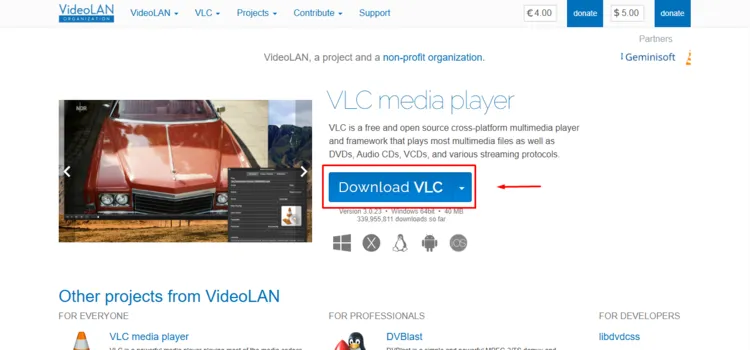
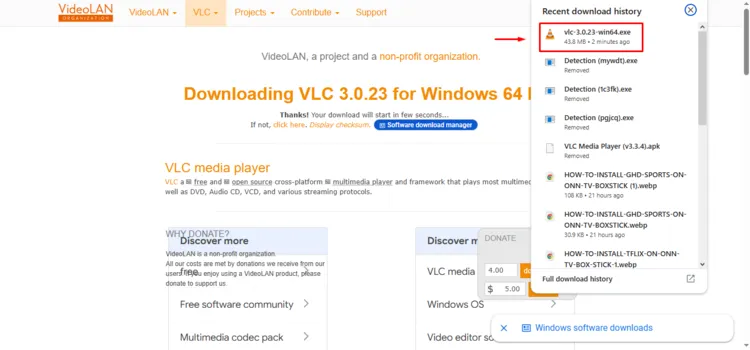
Step 1: Go to videolan.org and click on Download VLC.
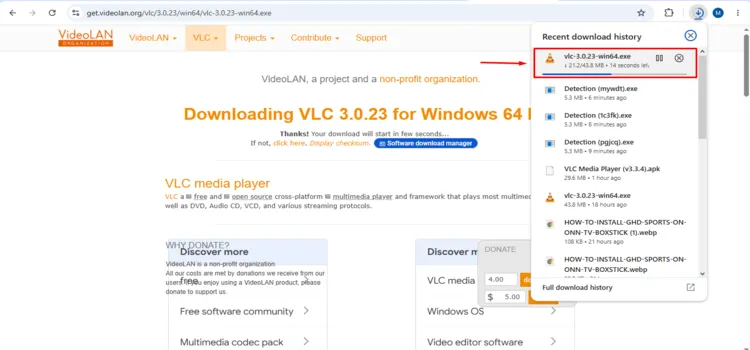
Step 2: Your exe file will start downloading.
Step 3: After downloading, launch the exe file.
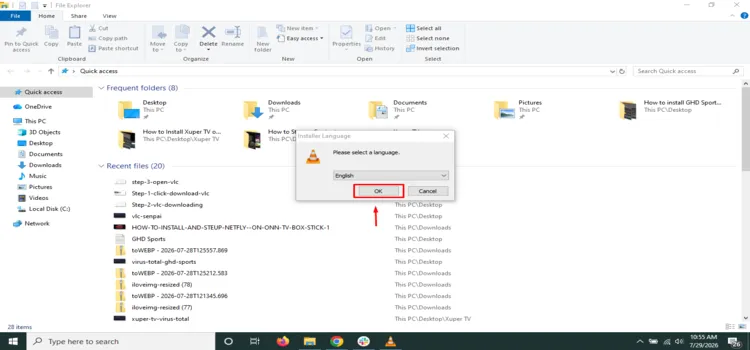
Step 4: Select your language and click OK.
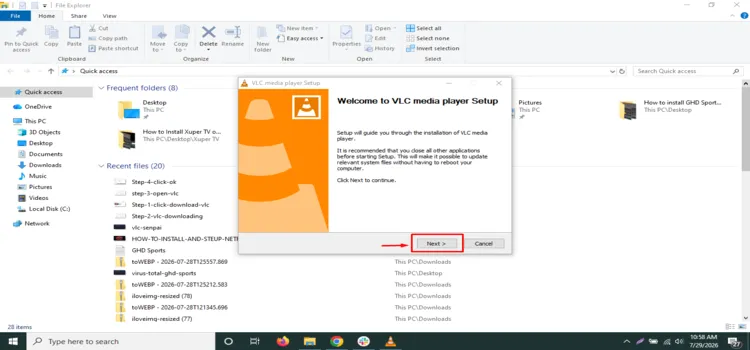
Step 5: Keep clicking Next.
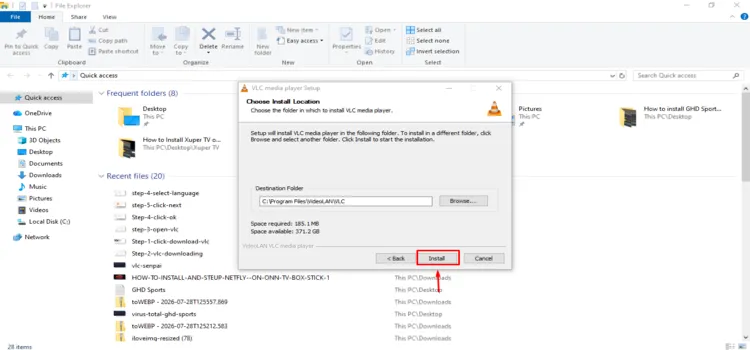
Step 6: Click Install.
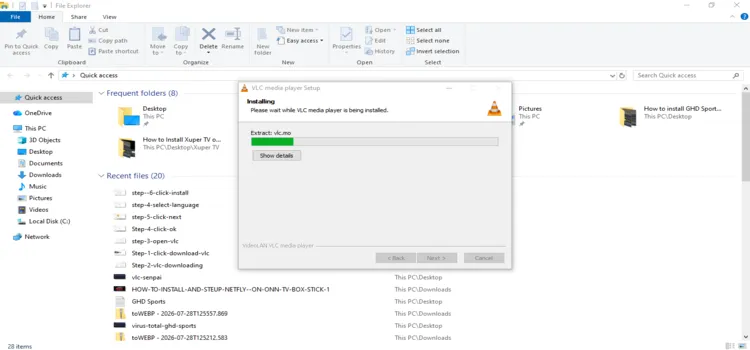
Step 7: VLC will start installing.
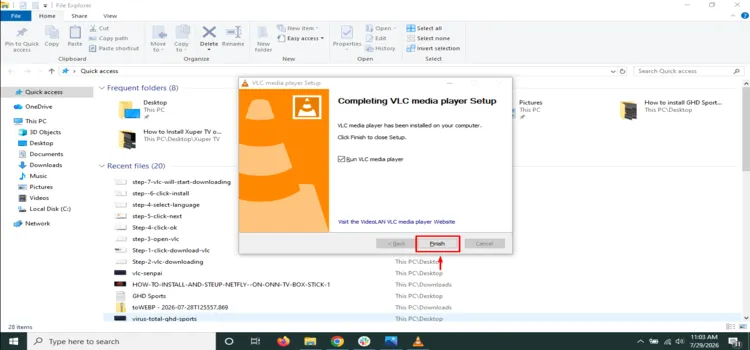
Step 8: Click Finish and launch VLC.
How to Add M3U Link to VLC
VLC does not support Xtream Codes, so you must first convert your XtreamCodes to M3U URL. Using a verified VPN like SurfShark helps counter ISP throttling and geo-restrictions.
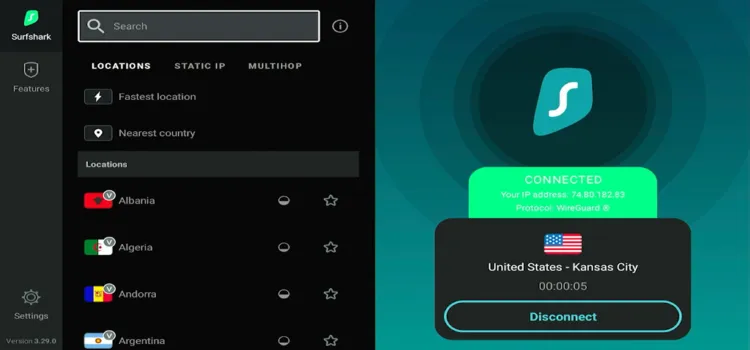
Step 1: Open Surfshark and select any server.
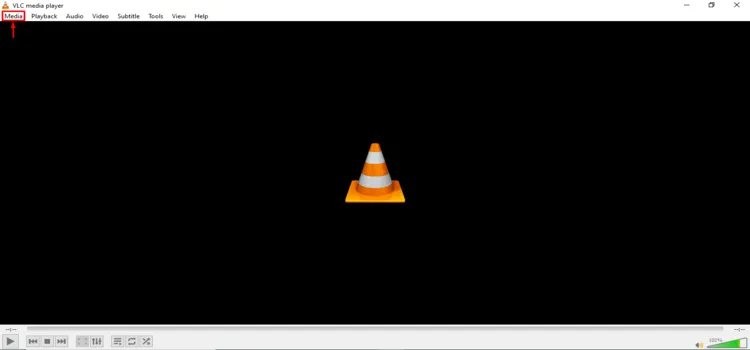
Step 2: After launching VLC, click on Media in the top left corner.
Step 3: Select Open Network Stream from the dropdown list.
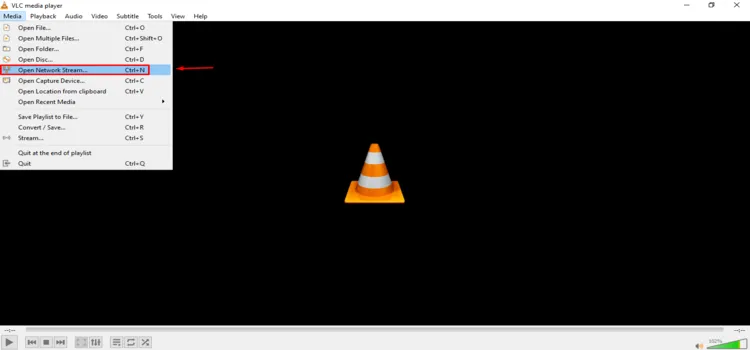
Step 4: Paste your M3U Playlist URL under the Network section.
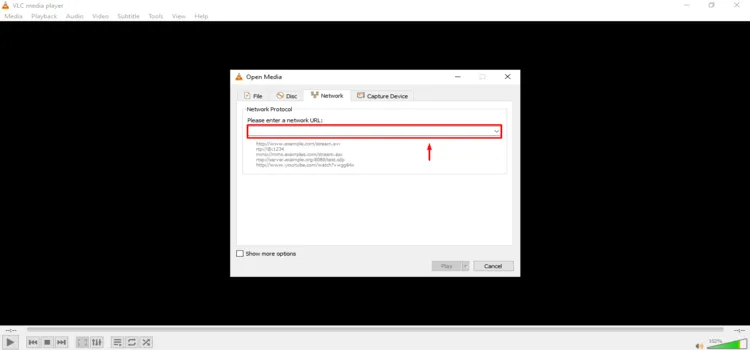
Step 5: Check the Show more options box if you need to adjust caching, and click Play.
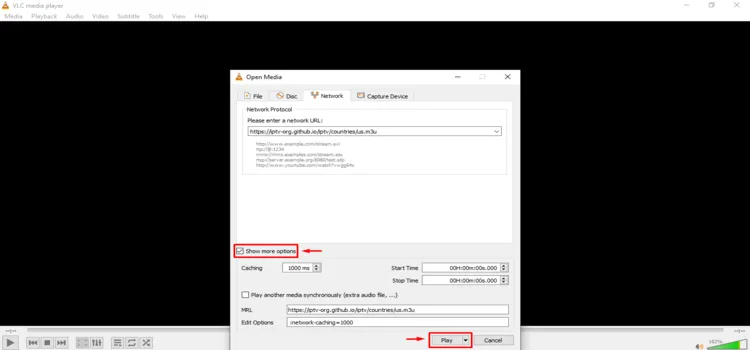
Step 6: Your playlist will start playing.

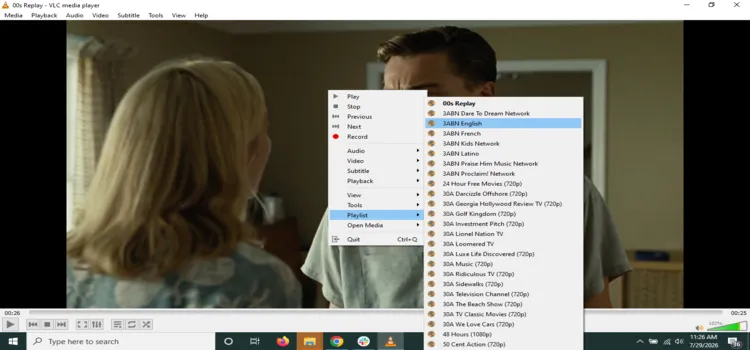
Step 7: To change your channel, right-click on the screen, go to Playlist, and select your channel.
VLC Best Features
VLC includes several useful playback features that make it a dependable secondary IPTV player. Here are some of the best features VLC offers for IPTV services.
1. Free – No ads/No spying
It’s completely free, has zero ads, and doesn’t track what you watch. The company behind it (VideoLAN) is a non-profit and refuses to sell ad space, which is rare.
2. Broad Format Support
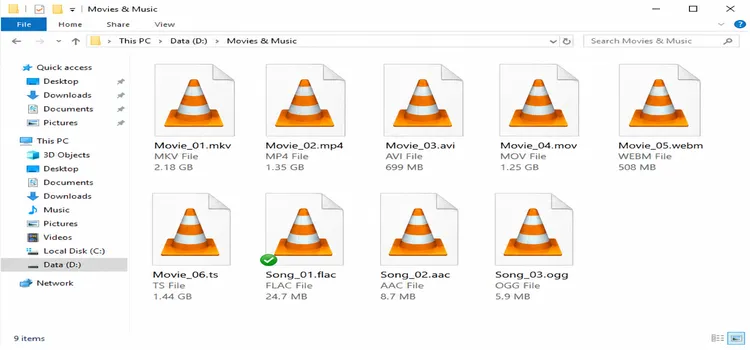
VLC supports common formats such as MP4, MKV, AVI, MOV, MP3, and tons more without installing anything extra. It also plays DVDs, Blu-rays, and audio CDs straight from the disc.
3. Hardware-Accelerated Decoding
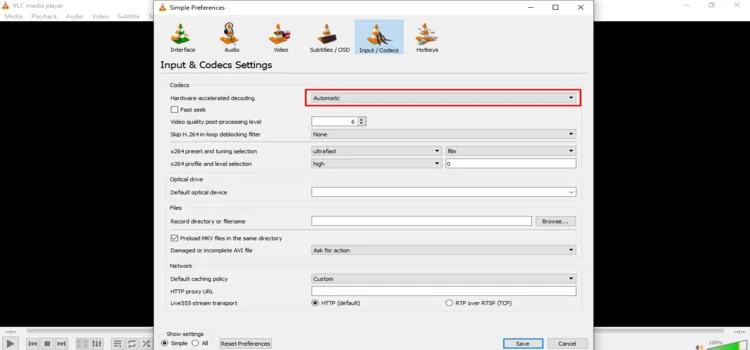
VLC utilizes hardware decoding on supported platforms, allowing the device’s processor and graphics hardware to support 4K, 8K, 10-bit video, HDR, and advanced audio features.
Go to Tools > Preferences > Input/Codes > Harware Accelerated Decoding
4. Multiple Audio and Subtitle Tracks
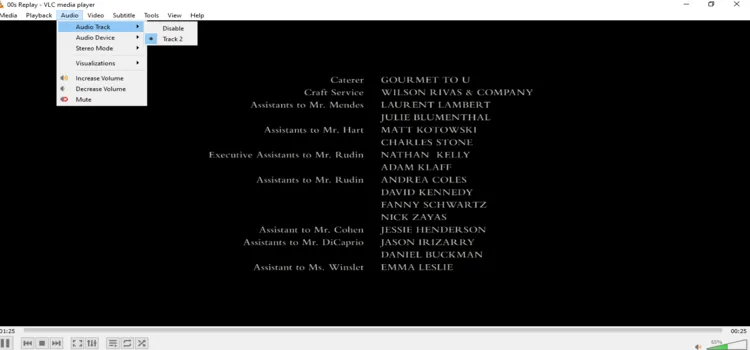
VLC supports multi-track audio and subtitles. You can switch between audio languages or correct audio and subtitle delays while streaming IPTV services. Drag a subtitle file onto the video and it loads subtitles automatically.
5. Aspect Ratio
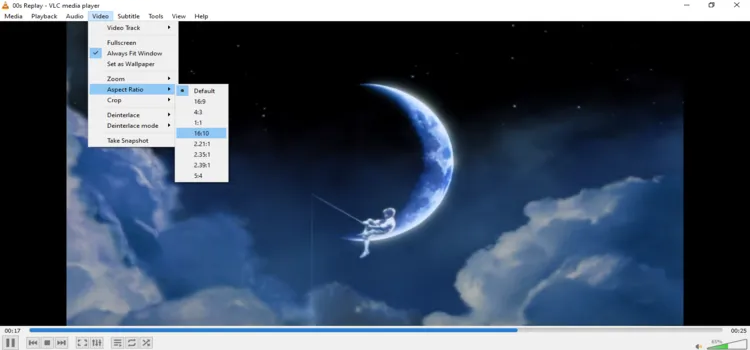
VLC lets you change the aspect ratio. The desktop version provides common options such as 16:9, 4:3, 16:10, 1:1, and several cinema ratios.
6. Audio Equalizer and Filters
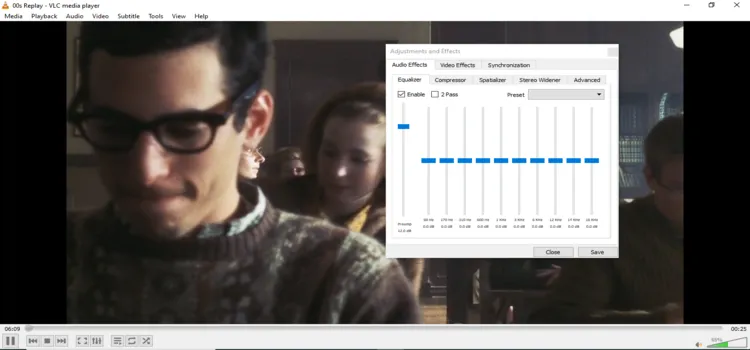
VLC includes an equalizer and several audio-processing tools. The options include equalizer, compressor, spatializer, and stereo-widening controls. These tools can improve low-volume channels or balance streams with inconsistent sound.
Go to Tools > Effects and Filters > Adjustments and Effects
7. Recording
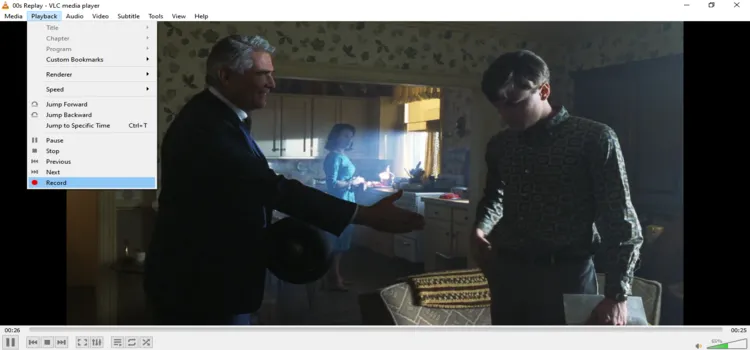
VLC lets you manually record your screen or webcam while your IPTV stream is playing in VLC. Manual recording available primarily on desktop
Go to Playback > Record
8. Converting Files
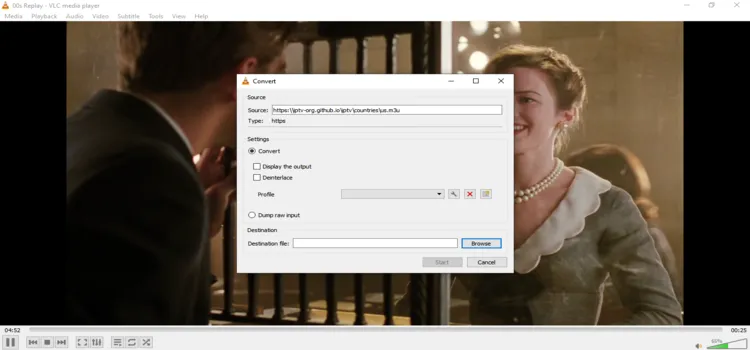
If a video won’t play on your phone or TV, VLC can convert media into a format that works. It can also shrink big files down to a smaller size.
Go to Media > Convert/Save or Open Media > Network > Convert/Save > Start
Is VLC Safe & Legal to Use?
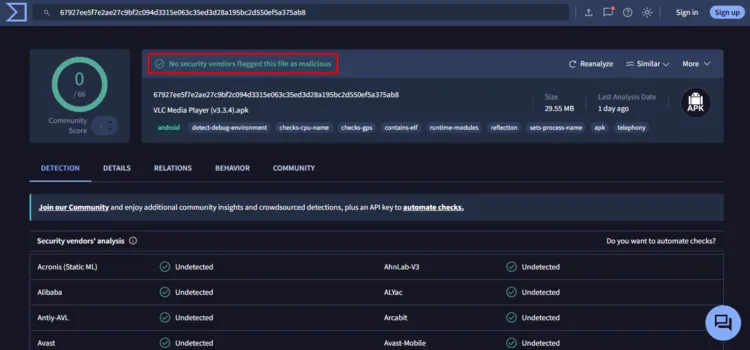
Unregulated streaming platforms often attract scrutiny and may expose your personal data to third-party trackers. I tested VLC Media Player v3.3.4 through a VirusTotal scan, with no malware or known security risks detected. Based on these results, the tested APK appears technically safe to install.
For stronger privacy, route your internet connection through a trusted VPN. Using Surfshark encrypts your traffic, reduces online tracking, and helps prevent your ISP from throttling your streaming speeds.
VLC Alternatives for IPTV
Here are some alternative IPTV players if VLC Media Player doesn’t suit you for IPTV playlists.
Supported Devices
VLC Media Player supports a wide range of devices and operating systems, including:
- Windows PCs/laptops
- macOS devices
- Linux/Unix-based computers
- Android phones/TV/Tablets
- Google TV devices
- Fire TV and FireStick devices
- Apple TV/iPhones/iPads
- Chromebooks/ChromeOS devices
- FreeBSD, NetBSD, OpenBSD, Solaris, QNX systems
FAQs
1. Can VLC Media Player stream IPTV channels?
Yes, VLC can stream IPTV channels through M3U, M3U8, HLS, HTTP, HTTPS. Open the network stream option, paste your playlist URL, and click Play.
2. Does VLC support Xtream Codes API?
No, VLC does not provide a native Xtream Codes API login. You must convert your username, password, and server details into a complete M3U playlist URL before loading it into VLC.
3. Why is VLC not ideal for large IPTV playlists?
VLC is a general media player rather than a dedicated IPTV application. It lacks a polished EPG, advanced playlist organization, catch-up TV, scheduled recording, and convenient provider management.
4. Can VLC record IPTV channels?
Yes, the desktop version of VLC allows manual recording while a stream is playing. However, it does not offer advanced scheduled DVR tools.
Conclusion
VLC Media Player is a decent option for streaming IPTV through M3U playlists and network links but not the best compared to IPTV Players.
VLC supports numerous formats, hardware decoding, subtitles, recording, and multiple devices, but lacks the polished EPG and playlist management of dedicated IPTV players.
For casual IPTV streaming, VLC remains a dependable secondary player. However, playlist legality depends on the provider you use. Pair VLC with a trusted VPN to encrypt your traffic and No VPN beats Surfshark.

