


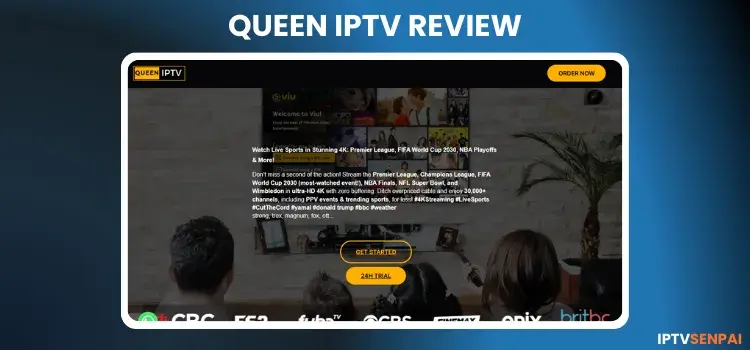
Queen IPTV has been operating for 2+ years in the streaming market. Its content is from North America, Europe, and Asia.
The service’s catalogue includes 155,000+ movies, 40,000+ TV series, and 48,000+ live TV channels, with a streaming resolution in HD, FHD, UHD, 4K, and 8K.
Their website has a 24-hour free trial option. After testing it, it turned out to be dissapointing experience espacially when it comes to the performance of VOD content.
Queen IPTV is an unverified IPTV service. To protect yourself from tracking by your ISPs, it is important to use a premium VPN. Surfshark is my #1 pick..
Recommended VPN for IPTV - Surfshark

Using IPTV without a VPN can put you at Big Risk! Your ISP, government and even IPTV providers can monitor your activity, throttle your speed, or block access altogether.
Plus, without encryption, your data is exposed to hackers and third parties. Take back your privacy with Surfshark!
Features:
✅ SAVE 87% + GET 3 EXTRA MONTHS FREE! ($0.06/day)
✅ Kill Switch Feature to protect you if VPN drops
✅ Lightweight app ensuring smooth performance on All IPTV Boxes
✅ Unlimited simultaneous connections (install on all household devices)
✅ 30-day risk-free money-back guarantee
✅ Strict no-logs policy, Secure & Untraceable
Official Website of Queen IPTV

Queen IPTV has several clone websites with similar branding, so users must be cautious when making a purchase. Always verify the URL and compare the site layout with the screenshot given above to avoid fake platforms and scams.
The service’s official website is queeniptv.store. Unfortunately, I cannot provide a direct hyperlink here. I suggest that users visit the website directly.
Does Queen IPTV Offer a Free Trial?
Yes, QueenIPTV offers a 24-hour free trial. To avail it, chat with the service provider through WhatsApp. Within 1 hour, you will receive your login credentials.
QueenIPTV Features:
- Trial: 24-Hour Free Trial.
- Pricing: Starting from $14/month.
- Connections: 1 device per plan.
- Live Channels: 48,000+ live TV channels.
- PPV: Available
- VOD: 155,000+ movies, 40,000+ TV series.
- Streaming Quality: HD, FHD, UHD, 4K, 8K.
- Payments: Paypal, Binance, MoneyGram, Western Union.
- Players Supported: Tivimate, IPTV Smarters Pro, Sparkle Player
- Devices: Firestick, Android TV, Enigma2, Formuler, MAG, Apple TV, Windows, Mac, Smart TVs
- Support: WhatsApp (somewhat responsive)
Pros & Cons
| Pros | Cons |
|---|---|
| Offers 24H Trial | Disappointing VOD Performance: Frequent buffering of movies and TV series |
| Offers streaming resolution from HD upto 8K | Most basic plans only allow for one device at a time. |
| Global channel coverage of North America, Europe, and Asia. | EPG is missing for many international categories outside the US/UK/CA. |
How to Get Queen IPTV
1. Sign Up for a Free Trial or Subscription Plan.
Step 1: Visit queeniptv.store and click the ’24H trial’ button.
Step 2: A new window will open. Click on Continue to WhatsApp Web.

Step 3: Chat with the service provider and request login credentials. You will receive login credentials (M3U URL and Xtreme Codes) within an hour.
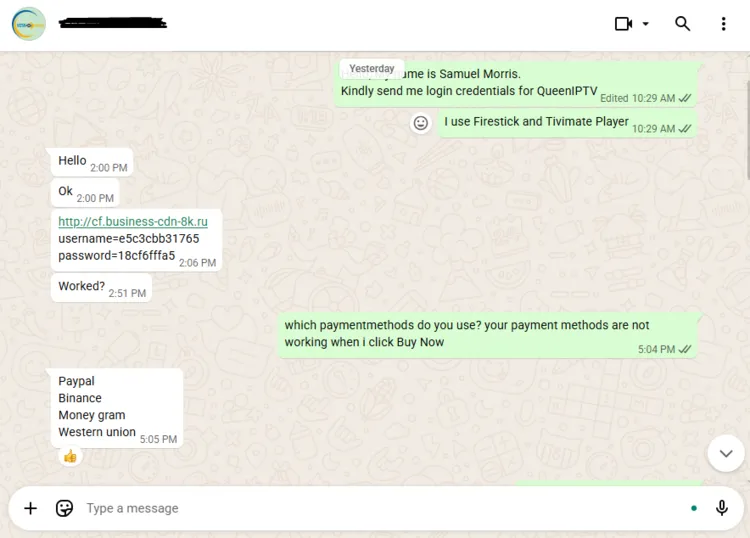
Step 4: If you want to buy a subscription. Scroll down the website, and you will see Pricing Plans below. Click Buy Now.

Step 5: WhatsApp will open. Chat with the service provider. He will send you the payment details.
[Note: After clicking on Buy Now, it mostly showed an error message. Only one time the WhatsApp window opens.]

2. Connect to VPN & Enter Login Credentials on your Player.
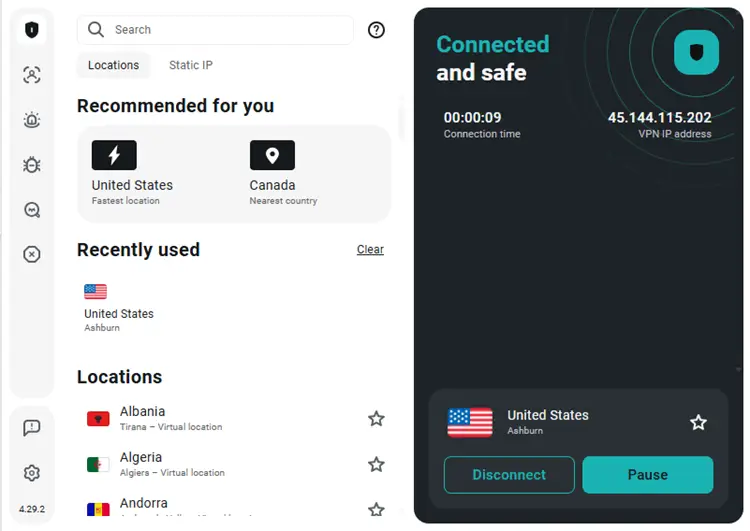
Step 1: Open the Surfshark app and connect to any Server.
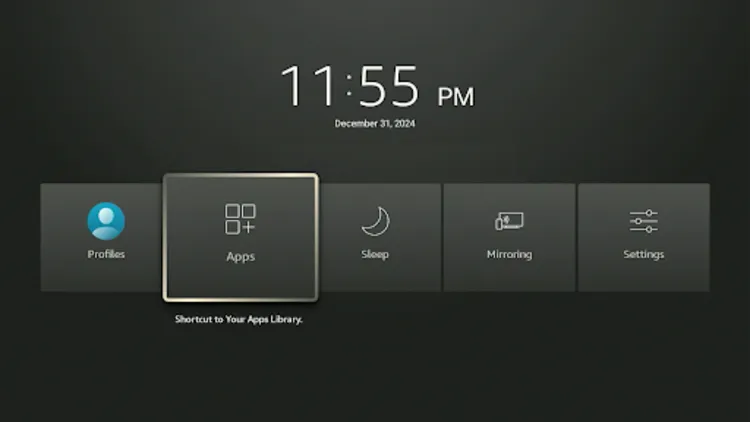
Step 2: Turn your Fire TV Stick on and long-press the Home button, and click Apps.
Step 3: Click on Tivimate Player.
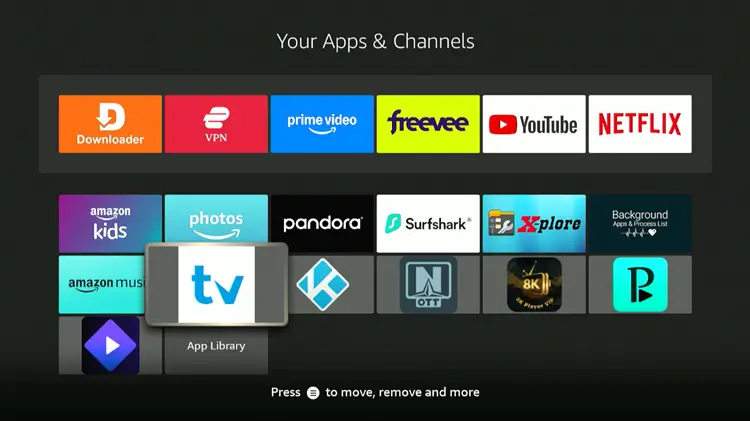
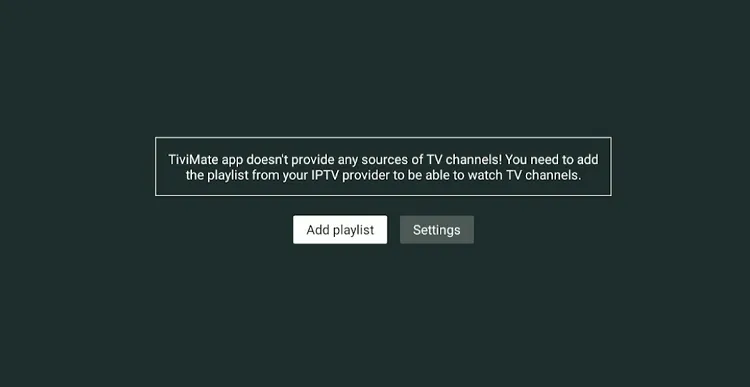
Step 4: Click Add Playlist.
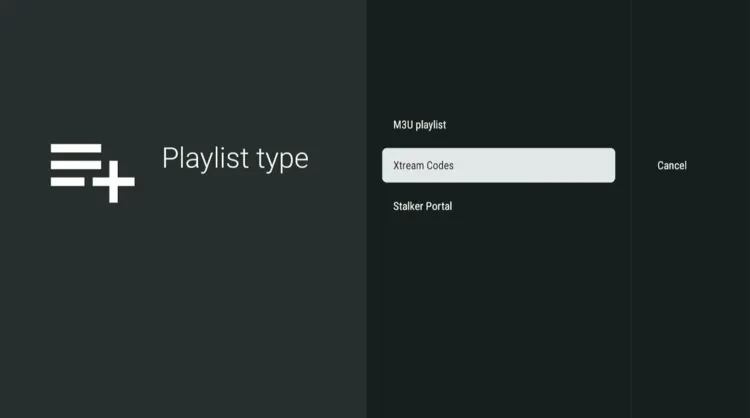
Step 5: Click on Xtreme Codes.
Step 6: Enter the Server address, Username, and Password provided by the service provider.
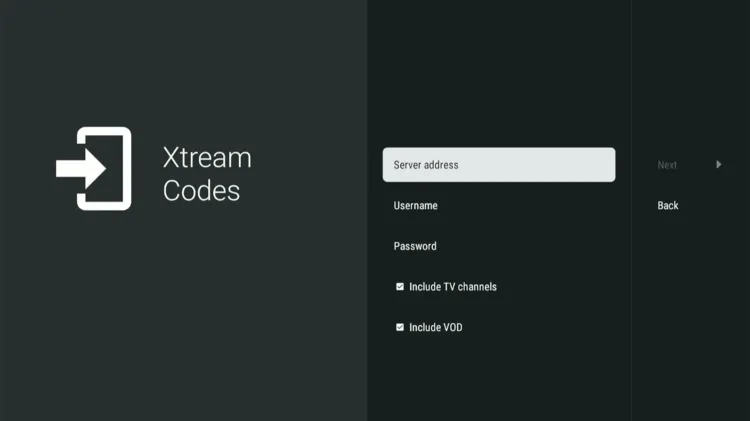
Step 7: Click Next. The playlist will be updated. Click Done.

Step 8: QueenIPTV has been successfully installed.

Step 9: Enjoy streaming!

What Can You Stream on Queen IPTV?
1. Live TV

QueenIPTV offers access to over 48,000 live TV channels worldwide, with a focus on North America, Europe, and Asia. Whether you’re looking for entertainment, news, or sports channels, QueenIPTV has you covered.
However, it’s worth noting that Electronic Program Guide (EPG) is available for the US’s News and Sports, Canadian News and UK Sports categories. It is missing from the remaining categories.
2. Live Sports:

Sports lovers will appreciate the diverse coverage on QueenIPTV, from football, cricket, basketball, and tennis. QueenIPTV delivers live streams from top broadcasters like Sky Sports, BeIN Sports, NBC Sports, TNT Sports, and Sky Sports in English and Arabic.
3. Video on Demand (VOD):

The VOD library is extensive, offering more than 155,000 movies and 40,000 TV series. Content is sourced from popular streaming platforms like Netflix, Amazon Prime, Disney+, Apple TV+, etc.
Pricing and Plans of Queen IPTV

Queen IPTV offers 4 subscription plans. All plans include access to live TV, VOD content, and PPV Events. The service offers a 24-hour free trial to new users.
QueenIPTV offers flexible pricing plans that cater to various needs:
- Number of Plans: 5
- Devices: 1
- Subscription Plans:
| Plan Duration | Package Type | Pricing |
|---|---|---|
| 1 Month | Silver Pack | $14 |
| 3 Months | Gold Pack | $24 |
| 6 Months | Platinum Pack | $39 |
| 12 Months | Diamond Pack | $59 |
| For Resellers | 10 Credits | $190 |
- Payment Methods: Paypal, Binance, MoneyGram, Western Union.
Is QueenIPTV Legal and Safe?
QueenIPTV is an unverified IPTV service, which means caution is necessary when using it. Since there’s increasing government action against unregulated IPTV streams, it’s essential to protect your privacy.
It’s necessary that the user’s internet is encrypted by Surfshark as it adds an extra layer of security by masking your IP address, blocking trackers, and ensuring a smooth and uninterrupted streaming experience.
Customer Support Experience

QueenIPTV’s customer support is quick. You can reach out through WhatsApp. Sometimes they take an hour or more than that. I received my credentials within an hour. Later, all the other questions were answered instantly.
QueenIPTV Alternatives
If you’re looking for other IPTV options, here are some alternatives to consider:
Frequently Asked Questions (FAQs)
1. Can I request a refund?
You can request a refund within 24 hours after subscribing to any plan.
2. What payment methods do you accept?
Payments methods: Paypal, Binance, MoneyGram, Western Union.
3. Is QueenIPTV legal?
QueenIPTV is an illegal and unverified IPTV service. Stay safe and protect your personal data from potential risks associated with using a premium VPN such as Surfshark.
Final Verdict
QueenIPTV isn’t as efficient as other IPTV services out there. Despite having a large library, constant buffering and lagging of VOD content is a letdown. But if users are still curious, then they can avail a 24-hour free trial to test it out.
The service has a large live TV and on-demand content, particularly for North America, Europe, and Asia. Their live TV works fine. Their customer support is somewhat responsive.
However, it is an unverified IPTV service; always use a VPN like Surfshark to safeguard user privacy and enhance your streaming experience.

