


Finding the right VPN for IPTV requires top-notch privacy and real streaming performance. Private Internet Access (PIA) often pops up as an affordable, open-source top choice because of its strict no-logs policy and massive server network.
PIA VPN is packed with privacy tools, but streaming consistency varies by server and may require tweaks during longer streams. Mobile users get a 7-day free trial, while desktop users pay upfront with a 30-day money-back guarantee.
This PIA VPN review 2026 covers features, encryption, pricing, and overall IPTV compatibility.
PIA VPN Quick Overview
- Servers: 35,000+ across 91 countries and all 50 U.S. states.
- Compatibility: Windows, macOS, Android, iOS, Linux, Fire TV, Android TV, and routers.
- Connections: Unlimited simultaneous devices.
- Protocols: WireGuard and OpenVPN; IKEv2 also available on iOS.
- Privacy: Audited no-logs policy, open-source apps, and RAM-only servers.
- Encryption: AES-128/AES-256 with OpenVPN, ChaCha20 with WireGuard.
- Price: From $2.03/month with the advertised three-year plan plus three extra months.
- Free Trial: Seven days for eligible new Android and iOS subscribers.
- Refunds: 30-day money-back guarantee on eligible purchases; Apple handles App Store refunds.
- Support: 24/7 live chat and email.
Pros & Cons
| Pros | Cons |
|---|---|
| ✓Unlimited simultaneous connections | —No permanent free plan or desktop free trial |
| ✓Audited privacy policy and open-source apps | —Advanced controls vary between platforms |
| ✓Customizable protocols and connection settings | —Current Fire TV app does not support Vega OS |
| ✓Multi-hop and split tunneling on supported apps | —Dedicated IP and antivirus cost extra |
| ✓Affordable long-term plans | —Live chat support can be inconsistent |
| ✓Large global server network | —Speeds vary on virtual servers |
| ✓Optional dedicated IP for a consistent address | —IPTV may require manual configuration |
Does PIA VPN Offer a Free Trial?
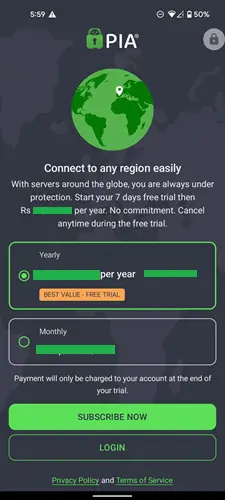
Yes, PIA VPN offers a 7-day free trial exclusively through its Android and iOS apps. You must select the yearly plan and provide your payment details to fully activate it. To avoid automatic renewal, cancel your subscription before the 7-day trial period ends.
If you need desktop access, you must pay upfront. However, you can safely rely on their 30-day money-back guarantee if the performance is disappointing.
Check out our blog: Best Free VPNs for IPTV
How to Install PIA VPN on Your Devices
You can easily install PIA VPN using two main methods. The best approach highly depends on your specific device and regional app restrictions.
1. Official App Stores
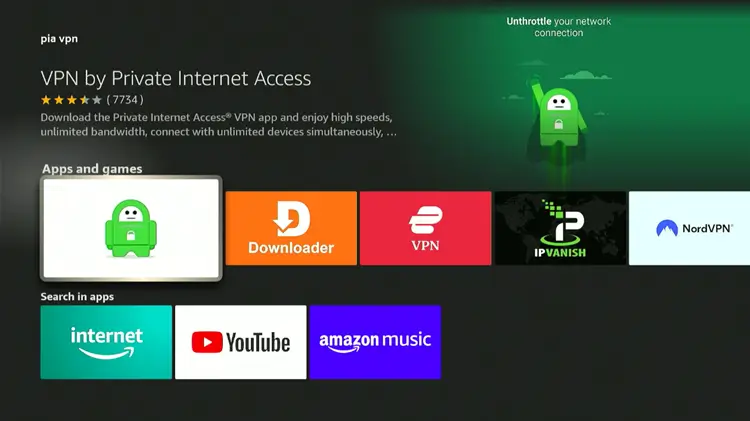
You can download the PIA VPN app from official app stores such as the Amazon App Store (Fire TV), Google Play Store (Android), and Apple App Store (iOS & macOS). Alternatively, you can download the latest version for other devices directly from the official website.
2. Downloader Method
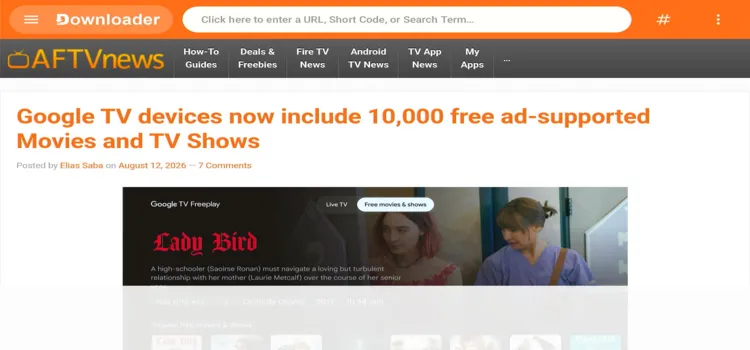
If the app is blocked in your region, sideload the APK using the Downloader app. Enter the PIA VPN Downloader 5546232 in the search bar OR enter this URL bit.ly/43pEVWO and click Go..
Is PIA VPN Good for IPTV? These Features Help You Decide
Here are the key PIA VPN features that can help you decide whether it is a good choice for IPTV:
1. Big Server Network
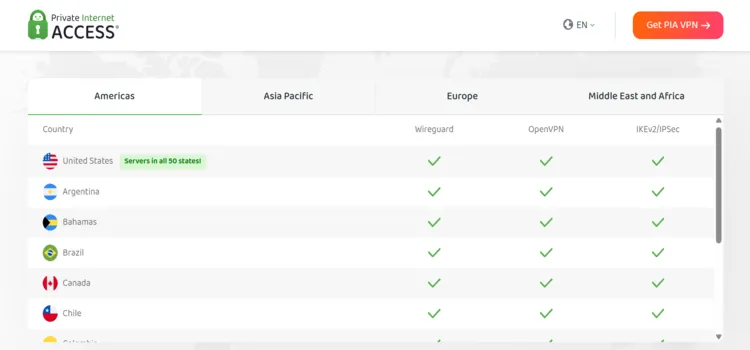
PIA VPN boasts 35,000+ servers in 91 countries, covering all 50 U.S. states. This guarantees exceptional flexibility for unblocking region-specific IPTV streams like local news or live sports. Some virtual locations use servers physically hosted in another country, providing an IP address for the selected region.
For everyday IPTV, use a nearby server for optimal speed. To access region-locked content, switch to a relevant location. But changing servers doesn’t guarantee platform acceptance, as many services detect and block VPN/proxy traffic.
Checkout our blog: OTTOcean IPTV review
2. No-Logs Policy
PIA maintains a strict no-logs policy, meaning it never records your IP address, browsing activity, or session data. This commitment is continuously verified through independent audits and tested in real legal scenarios.
While testing on both U.S. and UK servers, I noticed no signs of tracking or session retention. This level of transparency gives users strong confidence, particularly when using IPTV apps that might otherwise draw attention from ISPs.
3. AES-256 Encryption
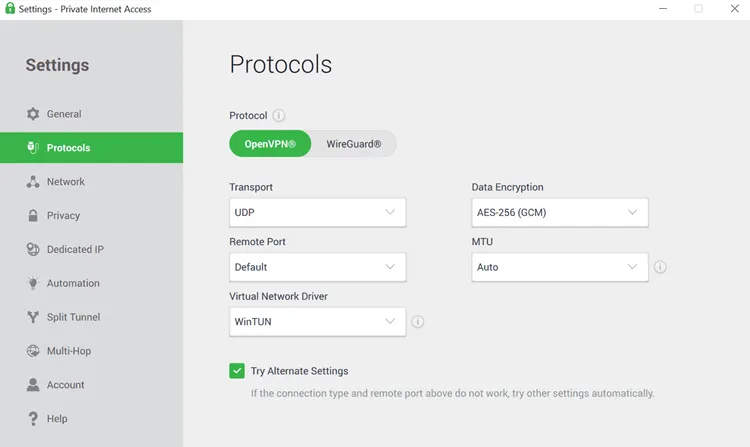
PIA uses AES-256 encryption, the same standard trusted by banks and cybersecurity experts. In my tests, I streamed live sports in HD on FireStick without any buffering or lag due to encryption.
For the absolute best speeds in 2026, always select the WireGuard protocol. It consistently outperformed OpenVPN, offering smooth channel switching between IPTV apps and maintaining solid speed.
4. RAM-Only Servers

PIA’s entire infrastructure runs on RAM-only servers. This means all temporary data wipes completely upon every server reboot, leaving absolutely nothing saved behind.
For IPTV users actively handling unofficial streams, this diskless setup offers ultimate peace of mind, knowing your activity won’t leave a trace.
5. Advanced Kill Switch
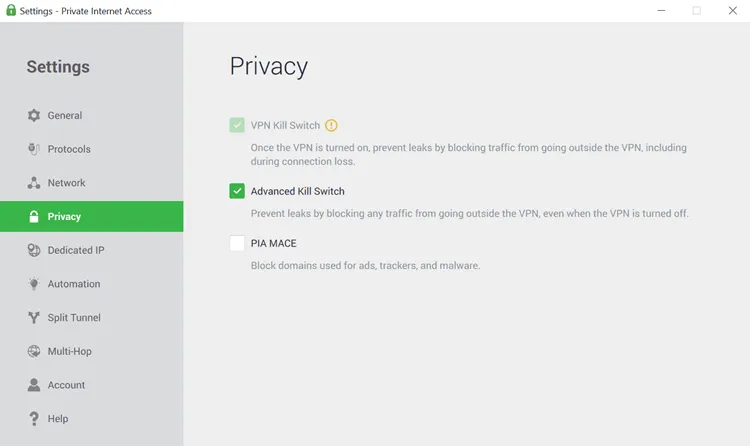
The kill switch activates automatically. During my test of pulling the VPN mid‑stream, the internet shut off instantly, which is exactly how it should behave to protect your IP.
However, it currently lacks manual tuning on Android TV. Unlike Surfshark, you cannot easily configure flexible background settings for continuous, uninterrupted IPTV streaming.
6. DNS & IP Leak Protection
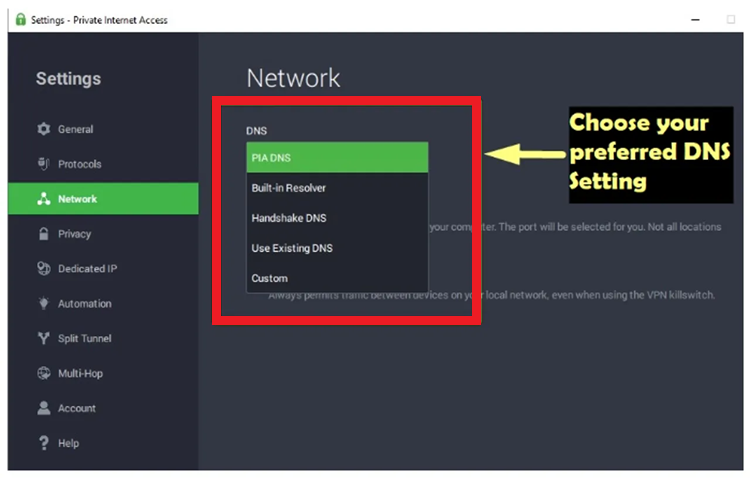
I ran multiple DNS and WebRTC leak tests on FireStick and Android TV while switching between servers. The VPN successfully and consistently blocked all potential IP leaks.
Even when switching rapidly between different IPTV platforms, the real IP address stayed fully hidden. This is absolutely crucial for successfully bypassing strict ISP restrictions.
7. Obfuscation & Multi-Hop
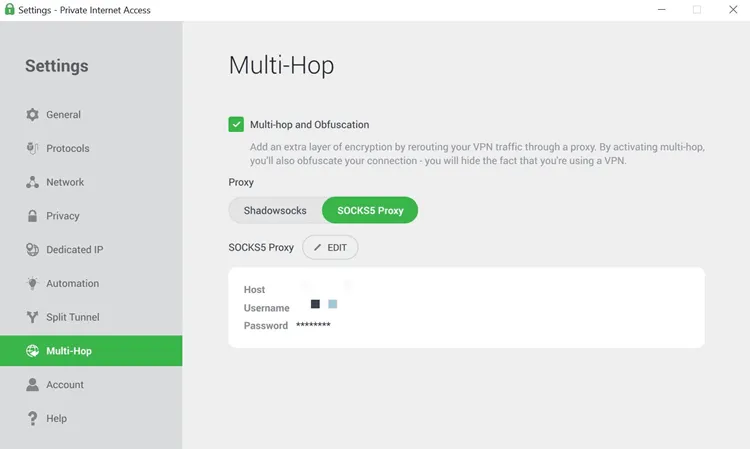
PIA features multi-hop and obfuscation technology to bypass censorship. Unfortunately, these powerful features are buried deep in the settings and not beginner-friendly to configure.
Testing a (Canada → Germany) multi-hop route caused a 40% speed drop. While incredibly useful for restricted regions, it is not recommended for daily IPTV streaming.
8. Dedicated IP
PIA offers a dedicated IP as an optional paid add-on. This static IP is exclusively yours. I tested it with multiple IPTV apps and noticed fewer CAPTCHAs and faster login times, especially on FireStick and Android TV.
The setup smartly uses a token system, ensuring no direct link between your account and the IP. It provides excellent overall stability for daily heavy streamers.
9. VPN Router Support
Setting up PIA directly on a router covers all household devices automatically and completely bypasses the tedious need to install individual apps on every Smart TV.
Once configured, streaming speeds on FireStick and Android TV remained highly stable. It’s a solid option for shared or family setups. However, the manual initial installation strictly requires basic router knowledge to succeed.
10. Split Tunneling

PIA’s Per App Settings on Android TV let you route specific apps through the VPN. This is useful when one app needs VPN protection while another works better through your regular connection.
Keep your IPTV player inside the tunnel if you installed PIA for privacy. Apps excluded from the tunnel use your normal internet connection and lose that VPN protection.
How is PIA VPN Customer Support?
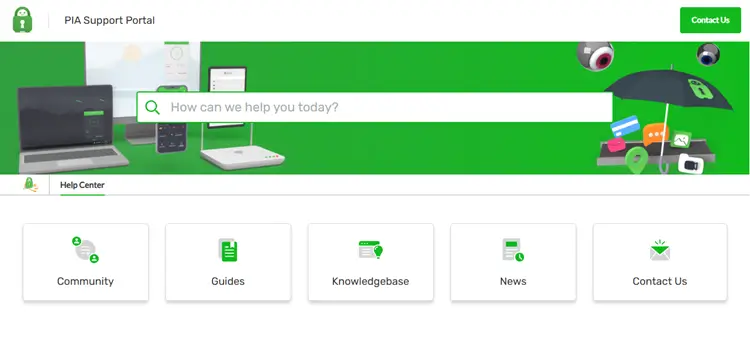 PIA offers 24/7 live chat and email support, alongside installation and troubleshooting articles. However, some online troubleshooting guides feel slightly outdated for modern 2026 IPTV configurations.
During testing, email support often proved more reliable than live chat. Mostly, Live chat worked fine but sometimes gave vague answers or failed to load entirely. No phone support is available, and advanced IPTV issues often require manual trial-and-error troubleshooting.
If you prefer the quick and clear assistance offered by ExpressVPN, PIA VPN’s support experience might fall short.
Prices & Plans
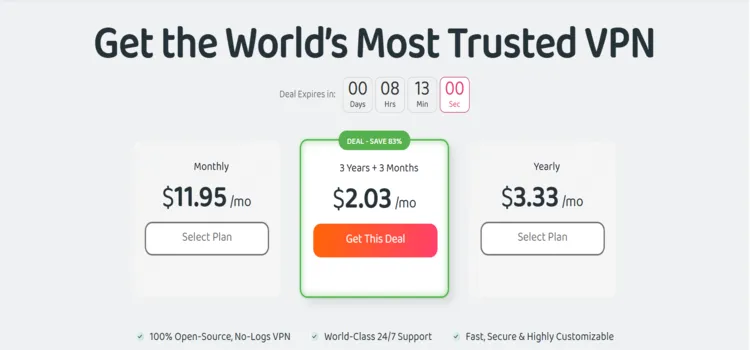
These are the prices on PIA VPN’s official website. Promotional terms can change, and prices may differ by region or purchase platform. PIA is cheaper than most long-term competitors, but it lacks built-in unblocking strength or free access like Proton VPN.
| Plan | Advertised monthly equivalent | Published billing/renewal terms |
|---|---|---|
| 1 month | $11.95 | Auto-renews at $11.95 monthly |
| 1 year | $3.33 | Billed at $47.88 first year and then auto-renews annually at $47.88 |
| 3 years + 3 extra months | $2.03 | Auto-renews at $79 every 3 years |
Note: PIA lacks the built-in unblocking features found in pricier rivals, but its long-term cost remains significantly cheaper for budget-conscious users.
Supported Devices
Here are the supported devices for PIA VPN:
| Category | Supported platforms and practical limits |
|---|---|
| Computers | Native apps for Windows, macOS, and Linux |
| Phones and tablets | Android, iPhone, and iPad |
| Android TV / Google TV | Compatible devices, including supported streaming boxes; availability varies by model and OS |
| Fire TV / Firestick | Fire OS 6 or later; Vega OS currently excluded |
| Apple TV | Native app on tvOS 17 or later; currently uses IKEv2 |
| Browsers | Chrome and Firefox extensions; browser protection does not cover a separate IPTV app |
| Routers and other TVs | Supported router configurations can provide VPN coverage; Smart DNS provides a different, unencrypted service |
PIA VPN Alternatives
If PIA VPN didn’t quite deliver the streaming experience you expected, here are some solid alternatives that may suit your IPTV needs better.
FAQs
1. Does PIA VPN have a free trial?
Yes, but exclusively on Android and iOS. Subscribing through the mobile app directly grants a 7-day free trial.
2. How do I fix buffering issues on PIA VPN?
Switch your app protocol to WireGuard, connect to the nearest physical server, or purchase a Dedicated IP for stability.
3. Does PIA offer a Dedicated IP?
Yes. It is an optional paid add-on that significantly reduces annoying CAPTCHAs and blocks during daily IPTV streaming.
4. Can I use PIA on multiple devices?
Yes, as of 2026, PIA securely supports unlimited simultaneous device connections on a single paid account.
Final Thoughts
PIA VPN is worth considering for IPTV if you value privacy, flexible settings, and transparency. However, streaming performance can vary, so choosing the right server matters more than the size of its network.
But this isn’t a plug-and-play VPN. While it supports IPTV and streaming apps, performance depends on server selection. Also, there’s no free trial unless you are using mobile apps.
For those who prefer a smoother, ready-to-stream VPN, ExpressVPN or Surfshark might offer a better overall experience.

