


TunnelBear VPN is an easy IPTV VPN, offering audited security, strong encryption, unlimited connections, and easy apps. However, its limited free data, weaker streaming reliability, small server coverage, and no router support make premium alternatives better for heavy IPTV streaming.
- Server Network: 8,000+ servers in 47+ countries
- Free Plan: Only 2 GB/month
- Price: Starts around $9.99/month
- Supported Devices: Windows, macOS, iOS, Android Phone, Chrome & Opera browsers
- Connections: Unlimited
- Support: Email & Chat Bot support.
- Supported Protocols: OpenVPN, IKEv2, WireGuard
- Security & Privacy Features: AES-256 encryption, no-logs policy, VigilantBear (kill switch), GhostBear (obfuscation), SplitBear (split tunneling)
TunnelBear Pros & Cons
A quick look at TunnelBear’s strengths and drawbacks to see if it fits IPTV streaming needs.
| Pros | Cons |
|---|---|
| Transparent Security Audits | Limited Free Data |
| Beginner-Friendly UI | No Refund Policy |
| GhostBear Obfuscation Mode | Limited features |
| Strong AES-256 Encryption + Kill Switch (VigilantBear) | Small Server Network (only 47 Countries) |
| Free Plan (2GB/month) | No Linux App/router support |
| Unsatisfactory customer support | |
| Unreliable in geo-blocking Netflix and other platforms. |
How to Install TunnelBear on Your Devices
You can install the TunnelBear app on your devices using either of the two methods.
1. Official App Stores
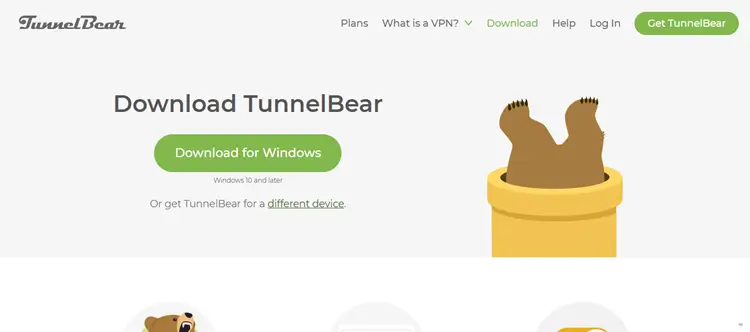
TunnelBear is available on the Google Play Store and the App Store. You can also download the app directly from the TunnelBear website for Windows and macOS.
2. APK Method
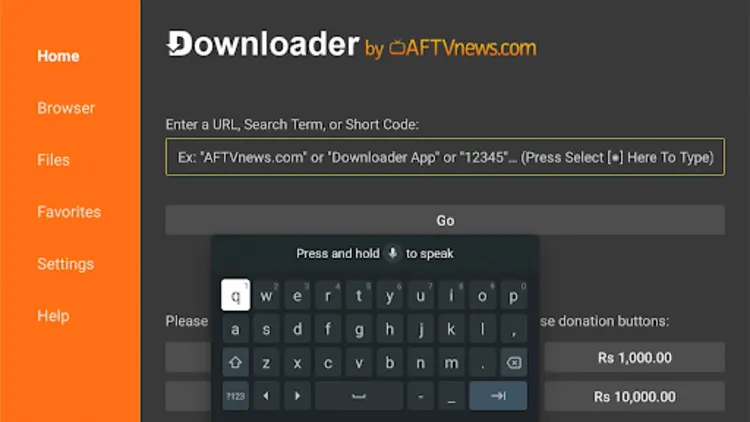
Since TunnelBear is not available on the Amazon App Store, Fire TV Stick users must sideload the APK with the help of the Downloader app.
Enter the TunnelBear APK downloader code 5546232 in the search bar OR enter this URL bit.ly/43pEVWO and click Go.
TunnelBear VPN Features for IPTV
We cover TunnelBear’s key features for IPTV, including strong encryption, GhostBear mode, and reliable servers for uninterrupted streaming.
1. Independent Security Audits

TunnelBear’s annual independent security audits give it a strong reputation for privacy. The audits ensure that your streaming activity stays private, and not a trace of your browsing or IP history is logged.
It follows a strict no-logs policy and only stores essential account details, like email and payment information. For IPTV users, this keeps streaming activity private, secure, and protected from unnecessary exposure, making TunnelBear a trusted option for safer streaming.
2. AES-256 Encryption & Leak Protection
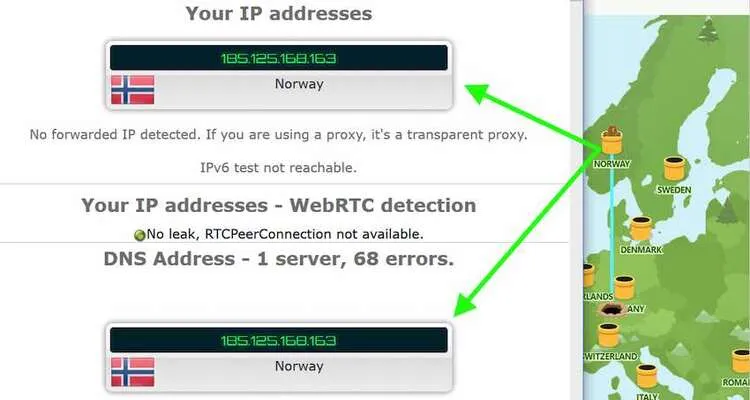
It uses AES-256-bit encryption with WireGuard, OpenVPN, and IKEv2 protocols across all platforms. I found no DNS, WebRTC, or IPv6 leaks, making it a secure pick if you’re watching IPTV streams that are often blocked or flagged.
Its kill switch, VigilantBear, protects you if the VPN drops mid-stream. For extra, GhostBear disguises VPN traffic from governments, businesses, and ISPs.
3. Beginner-Friendly Design
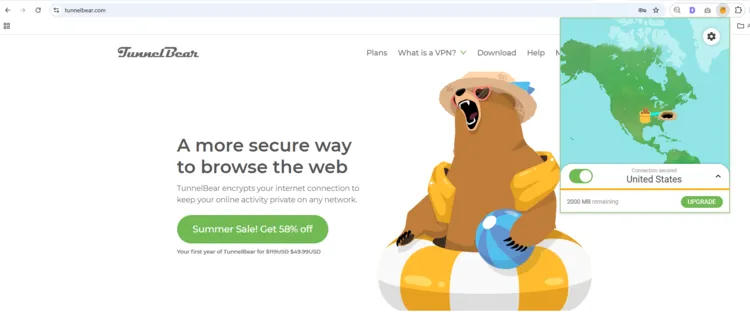
4. Unlimited Connections
TunnelBear offers unlimited simultaneous connections, letting you protect all your devices with one subscription. It has apps for Mac, Windows, Android, and iOS, along with browser extensions for Chrome, Firefox, and Edge.
It also supports IPTV devices like Android TV, Fire TV Stick, and Apple TV. However, TunnelBear lacks router support, so you can’t secure your whole home network, which may be a drawback for smart devices and IoT equipment.
5. Customer Support
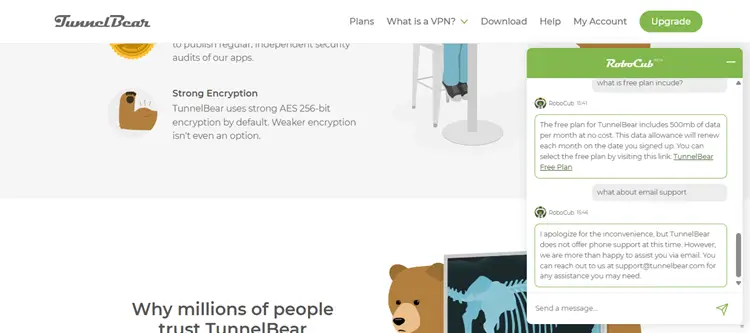
TunnelBear provides live chat support for quick help with common issues, such as subscription plans, security questions, and basic setup guidance. This makes it easier for new users to get answers without spending too much time searching through help articles.
For more detailed questions, TunnelBear also offers email support at support@tunnelbear.com. In my case, the response was received within 2 hours, which felt reliable enough for users who need help with VPN setup, account issues, or IPTV-related streaming problems.
6. Server Network and Location

TunnelBear provides 8,000+ servers in 46 countries, giving users good global coverage for secure browsing and IPTV streaming. It offers multiple server options in the US and Canada, but other regions do not show detailed server locations.
TunnelBear Pricing & Plans
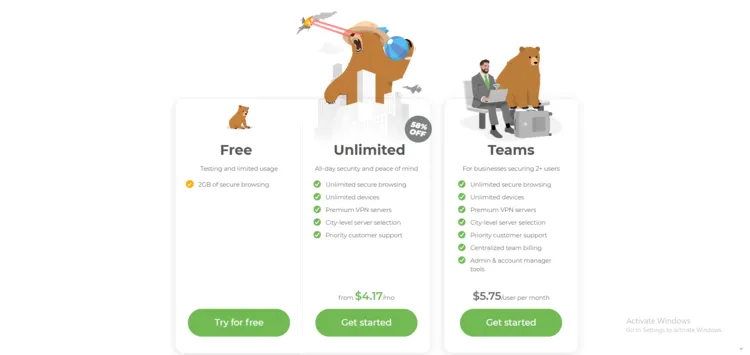
When it comes to pricing, TunnelBear is positioned right in the middle. It’s not the cheapest, but it’s not overly expensive either. It costs $9.99/month and drops as low as $3.33/month with the 3-year plan. You get unlimited data, unlimited devices, and an easy, beginner-friendly experience.
While this deal is great if you’re willing to commit long-term, it’s not as flexible as it does not offer any money-back guarantee. Here are the free and paid plans best for IPTV users.
| Plan | Monthly Cost | Total Cost | Savings |
|---|---|---|---|
| Free | $0 | 2GB/month | N/A |
| 1 Month | $9.99/month | $9.99/month | 0% |
| 12 Months | $4.99/month | $59.88 for 1 year | 50% |
| 3 Years (Best Value) | $3.33/month | $120 for 3 years | 66% |
If you’re after the cheapest option, Surfshark wins at around $1.99/month, offering unlimited devices and solid features. On the other end, NordVPN costs $3–$4/month, but you get faster speeds, stronger privacy, and better streaming support.
Supported Devices & Compatibility
| Category | Devices |
|---|---|
| Computers, Tablets & Phones | Windows, macOS, Android, iOS, Linux |
| Browsers | Chrome, Firefox, Edge extensions |
| Streaming Devices | No direct support for FireStick, Roku, or Apple TV (manual configuration needed) |
TunnelBear Alternatives
FAQs
1. Is TunnelBear VPN safe to use?
Yes, TunnelBear is safe. It uses AES-256 encryption and is one of the few VPNs that undergo independent security audits every year.
2. Does TunnelBear work for streaming IPTV?
It works for some IPTV apps, but performance can be inconsistent compared to premium VPNs. The free plan is very limited for streaming.
3. Is TunnelBear VPN free?
Yes, TunnelBear has a free plan, but it only gives 2GB of data per month. For more data and connections, you’ll need a paid plan.
Final Verdict
TunnelBear remains a trustworthy VPN in 2026 thanks to its independent audits, simple apps, and solid privacy features. It’s a great pick for beginners or casual IPTV users who want a no-fuss VPN.
For IPTV streaming, it works with some apps but lacks the speed and unblocking consistency of premium VPNs like Surfshark. The free plan is handy for testing, but serious streamers will need a paid service.

